Basic Limitations of Perfect Binding (Paperback, Softcover, V2 Glue Binding)
Maximum document thickness after binding: 50 mm
Maximum print format for binding: A4 (size of the closed document)
Preparing the PDF for Print
The cover and the inner contents are prepared as two separate PDF documents. It is ideal to start by preparing the inner contents, as the final page count directly determines the size of the book spine.
Inner Contents
Trim, Safe Zone, and Bleed
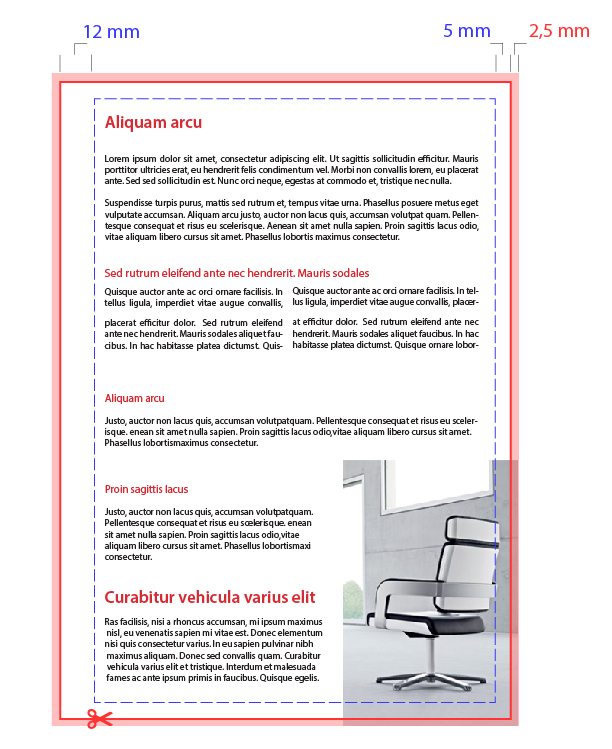
The red line indicates where the document will be trimmed. The trim cut may not always be 100% precise, which is why it is crucial to respect the safe zone.
The blue line highlights the safe zone, which text and other critical design elements must not cross. Anything outside the safe zone risks being trimmed or hidden inside the binding.
The pink area represents the bleed. Bleed refers to the extra area added to the final dimensions of the graphic design – specifically, an additional 2.5 mm of graphics on each side. As shown in the image, the background graphics extend past the trim line (the person's head at the top and the chair wheels at the bottom go beyond the trim to create the bleed).
Info for Printing Text-Heavy Books
If you are preparing a book where the inner contents have plain white margins, you do not need to worry about the bleed at all. Just ensure that your text is placed sufficiently far from the edge (adhering to the safe zone).
Binding Position on Individual Pages
In a double-sided printed and bound document, odd-numbered pages have the binding on the left side of the layout, while even-numbered pages have it on the right side. Keep in mind where the binding will interface with your artwork and adjust your design accordingly.
If your document includes page numbering, make sure it is aligned properly with respect to the binding side.
Tips for Preparing Book Contents in Microsoft Word
You can easily prepare your book contents using Word or any other word processor that allows exporting to PDF. Here are the recommended document settings:
- Font size: 11 pt
- Document margins:
- Left: 18 mm
- Right: 10 mm
- Top: 10 mm
- Bottom: 10 mm
- The 18 mm margin must be on the left for odd pages and on the right for even pages. To achieve this, set your page layout margins to "Mirror margins".
- We also recommend placing page numbers in the footer, aligned to the center.
Other Recommendations
- The document can easily have a bleed larger than 2.5 mm
- Including crop marks is a plus, though they are not strictly required
- For more details, please check out Basic principles of graphics preparation for print
- We can print and bind your document even without a bleed or safe zone. In that case, the final document will have white borders (the artwork will not extend to the edge of the paper).
Cover
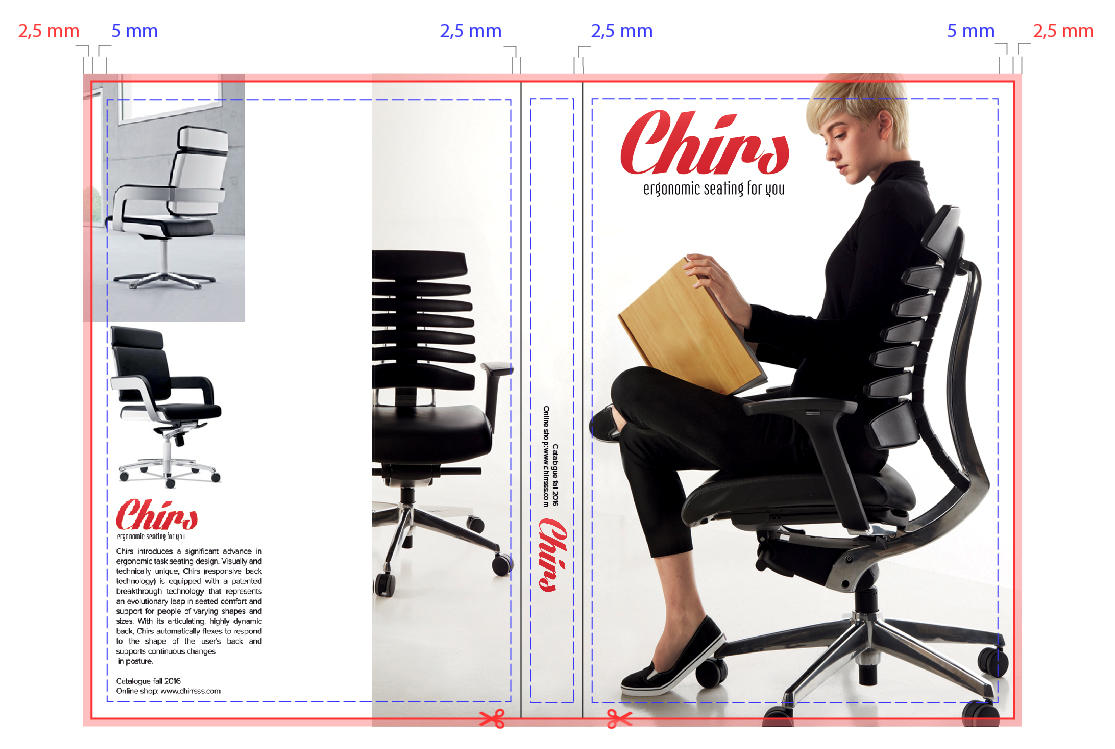
The cover is prepared as a single, standalone PDF that contains the artwork for the front cover, the back cover, and the spine all together in one layout. To design the cover layout correctly, it is essential to know the exact thickness of the book spine. 3 Ways to Determine Spine Thickness:
A) Contact us:, Let us know your page count and chosen paper type. We will calculated the spine thickness and send it to you right away. Our graphic designer is also available to help you create a simple cover or add a spine to your existing front and back cover designs.
B) Generate a custom template online:
- Open the page https://www.expresta.eu/glued-binding
- Upload your PDF file containing the inner contents.
- Select your desired paper type and the final document dimensions.
- Proceed to the cover upload step.
- Based on the page count and paper type, our system automatically calculates the exact spine dimensions and displays a template for your cover. Once designed, you can upload it right away to verify if it was set up correctly (and place your print order straight after :) ).
C) Calculate the spine thickness "the old-fashioned way":
Double-sided print
Thickness of the spine = Page count of content / 2 x thickness of the paper+ 2 × Cover paper thickness
Single-sided print
Thickness of the spine = Page count of content × thickness of the paper + 2 × Cover paper thickness
The paper thickness is always stated next to the paper name in our configurator..
For example: Premium office paper (0.1 mm / 80 g/m²)
Once you know the spine thickness, you can calculate the total width of the cover layout. Then, simply adhere to the safe zones and bleed shown below.
Warning: We do not recommend placing text on the spine for books with a spine thickness of 5 mm or less.
Our Assurance
We check every single file submitted by our customers prior to printing to guarantee a high-quality final product. You don't have to worry about making a mistake while preparing your PDF – we will catch it and contact you to help you fix it. Additionally, our graphic designer is always at your disposal to help convert your materials into a print-ready document.
Warning: Our file check only covers technical pre-press readiness; we do not check for grammatical, spelling, or content accuracy.
You can find the configured templates here:
InDesign template V2 A5
InDesign template V2 A4
InDesign template V2 210 × 210
Word template V2 110×180
Word template V2 130 × 200
Word template V2 170 × 240
Word template V2 210 × 210
Word template V2 A4
Word template V2 A5
Order Perfect Binding in Up to 5 Languages
You can now order perfect binding in English – Perfect binding, Slovak – Brožovaná väzba, Czech – Brožovaná vazba, Hungarian – Puhatáblás kötés, German (DE) – Softcover-Bindung and German (AT) – Softcover-Bindung.


